Final Reflection: Finished Projects & Looking Forward
- Rachel Molnar
- Nov 21, 2025
- 5 min read

Thank you for following along so far with my 3D art learning journey!
As I mentioned in my first post, this series of weekly posts detailing my efforts to improve as a 3D artist is an assignment for my seminar class at Clark University. We were given the option to choose any focus that interested us most and present our research findings each week through blog posts and presentations. I decided that my goal was to "teach myself industry-standard programs and techniques to better myself as a 3D artist."
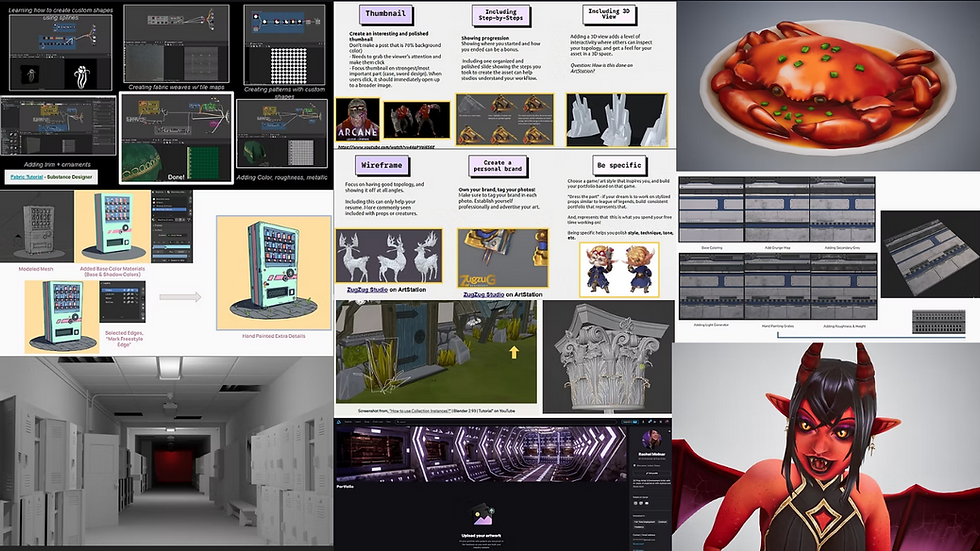
In the past few months, I've achieved a lot. I delved deeper into Adobe Substance Designer, learning how to design a trim sheet, practicing its creation, and texturing it. I also worked on becoming a Blender Pro by researching its features, including particle effects, exploring all the "add menu" options and modifiers, and even learning about collection instances. I explored Blender's Grease Pencil feature, which I discussed in my last post, where you can combine 2D and 3D art to create stylized 3D objects for games or animation. That certainly is a lot of ground I've covered, and it's been really fun diving a little deeper into these programs that I had only barely explored before.
While Blender isn't yet considered “industry standard”, it's the program I've been taught at university and have spent the most time learning. My belief is that a better understanding of this program will allow those skills to easily translate into other industry programs, such as Maya. More than just learning how to model, I've also learned about design and making strategic choices when designing textures and models.
It was particularly cool to dive back into Adobe Substance Designer. I remember when I first learned it briefly two years ago in a texturing class; it seemed so overwhelming and confusing that I decided I was just never going to use it. It was really nice to take the time on my own to study and challenge that frustration, ultimately creating my own textures and practicing creating ones from tutorials. I'm glad I challenged my doubts because now I feel much more comfortable with the program and can see how useful it is for both modularity and optimization in games.

One of my biggest takeaways from my trim sheet project was that less is more. I started with a concept that had excessive detail and lacked well-thought-out modularity. Over the course of production and modeling, I tweaked my idea every week and ended up with something completely different from my original concept, but something I'm really happy with—it’s much less complicated and easier to look at.
It's really cool how we can create complicated textures by modeling all the desired details and then creating something completely 2D that has no varying geometry. This technique helps us create really interesting environment details while preserving game optimization.


Learning more about Blender was also incredibly interesting. Going into this research, I was under the impression that I knew most of Blender and just needed to learn a few extra things. It turns out there was a lot about it I had never seen before or tried experimenting with, particularly important things I was missing.
As mentioned earlier, one of the most useful things I learned about Blender was the collection instances feature. This feature allows you to duplicate an object, creating a parent-child relationship. If you edit the features of the child object (the duplicate), none of the other objects in the scene will change. However, if you change the properties of the parent model, then all of the children (all collection instances of it) will be edited simultaneously.

I learned that collection instances not only speed up the tweaking process but also save an incredible amount of data. The file size for simply duplicating an object is much greater than if you were to create a collection instance, which is essentially just a copy that shares all the features. This is incredibly useful when creating complicated assets like a floral pillar or even just editing tufts of grass in your scene.
Lastly, I had a lot of fun learning about Blender's Grease Pencil feature, a tool that allows the combination of both 3D and 2D art to create animations and even games. I thought it was really cool how strokes follow the camera's perspective and how you can bake lighting and manually select the colors you want displayed in sunlight versus shade. I had a lot of fun creating a vending machine by following a tutorial and now feel very inspired to try animating since I already have a background in 2D digital art and a little animation experience.

Before taking this class, I rarely dedicated time to research and improve myself as a 3D artist outside of schoolwork. Sometimes it can feel overwhelming with so much homework and class that by the time I get home, I don't have the energy or desire to research further. Dedicating this time to learn these things on my own from amazing artists and resources online has been quite a beneficial experience and has sparked a desire to learn more and improve myself in every way as a 3D artist. While some of these concepts were introduced to me at the university, there simply isn't enough time to cover all these different skills in depth, so it was valuable to build off the knowledge I had to learn even more and practice new skills.
My next post likely won't be until January when I begin the second semester of this class. My hope going into the next semester is to focus on creating more polished pieces. At the moment, I don't feel as though I have a solid portfolio because all of my submitted class projects feel like amateur work—or, how I would put it, "the best I could do with the information I had just learned". Now that I have taken the time to explore these programs a little more deeply, my goal is to start creating pieces that I can be proud of and post on my ArtStation.
I want to learn what makes a good portfolio, what constitutes a good polished piece, and how to properly display my work on my ArtStation. Since I will be graduating from Clark University in Spring 2026, I am motivated to prepare myself for the industry as best I can and really focus on starting to create pieces that I'm proud of.
I look forward to sharing this new adventure with you all, and I appreciate you for following along this far. Until next time!


Comments