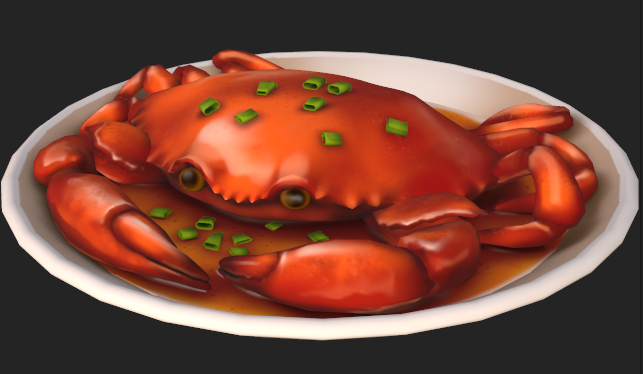
Building My 3D Art Portfolio: Blog Post #2 - "Stylized Crab"
- Rachel Molnar
- Feb 13
- 3 min read

Updated: Mar 11
Welcome back to my blog!
In my last post, I primarily focused on the logistics and criteria involved in creating a portfolio piece - "what should I include in a post? How do I optimize my model for sharing?" This week, my main focus was to apply all the research I had previously gathered and begin creating my first post asset: a stylized crab!
In my previous post, I mentioned that I was struggling to choose between stylized and realistic art. After giving it some thought, I realized that by separating the two styles in my portfolio (under different folders or even separate accounts), it is possible for me to pursue both. However, the only way to know if I truly prefer one over the other is to try both styles. I came across a post by @coralkate.art on my Instagram feed and thought it would be a great challenge to recreate. I love her art style and was excited to challenge myself by bringing it into 3D.
I’ve also been taking a sculpting class using ZBrush, so I decided to apply what I’ve been learning to this model by sculpting the rough ridges of the crab and creating a high-poly version.
Based on what I’ve learned about proper workflow, my first step was to create a low-poly version of the crab, which I could then use as a base for sculpting:

I set up a camera angle facing my model and matched it to the angle of the reference image behind it so I could accurately compare proportions.

Next, I took my low-poly crab into ZBrush and sculpted out the details.

After that, I used ZRemesher to lower the poly count of the sculpt and imported it into Blender. I then used RetopoFlow to clean up the higher-poly areas that didn’t have good topology, making sure to keep everything in quads.

Once that was finished, I exported both the low-poly and high-poly versions of my crab and brought them into Substance Painter for texturing.

At this stage, I ran into a LOT of issues while baking the models together.

I tried re-importing and re-exporting my meshes multiple times in an attempt to fix the issue, but nothing worked. After searching online for answers, I came across Chiimera’s YouTube video, "How to Paint Over/Fix Normal Bakes | Substance Painter" In the three years I’ve been modeling, I NEVER knew this was possible, but it makes so much sense! Following her brief and helpful tutorial, I learned how to isolate my normal map in Substance Painter and manually repaint the unwanted normals to fix my baking issues.

Although this method worked, I realized there were still unwanted marks left behind after removing the incorrect normals. I realized I would likely need to do the same cleanup process for the ambient occlusion map as well.

At that point, I had painted away the visible issues. However, after consulting my professor, he ultimately gave me feedback that my crab’s body was “too low poly,” and that it would be impossible to achieve the spiky shell details I wanted without properly modeling forms that could bake correctly.
This means I’ll be using RetopoFlow on my crab for a THIRD time. I had no idea such a small prop would consume so much time!
This post is going up a bit later than I had hoped because I originally wanted the crab to be finished by now. However, I need to take the time to properly fix the topology so it contains the correct information for baking. Even so, I’ve already learned a lot from this process, and I expect I’ll still need to refine the normal and ambient occlusion maps later to eliminate projection issues.
I was initially hesitant to increase the poly count because I assumed lower poly counts were always optimal. However, my professor made it clear that my model was too low poly, and that the details I wanted simply wouldn’t bake properly without better geometry and remeshing.
My goal for the next post is to have my crab remodeled and ready for texturing. While I originally hoped to complete this project in two weeks, sometimes art can’t be rushed. I’ve put so much effort into making the crab proportionate and accurate so far, there’s no point in getting sloppy now. I want this to be a polished portfolio piece that I can be proud of, while also applying the presentation techniques I’ve learned over the past few weeks, so I just need to remind myself to take my time and get it right.
I’ll keep you all updated on the new crab model soon!

Comments